
Guides
How to Calculate Reorder Level: A Step-By-Step Guide
TL;DR
Reorder level tells you exactly when to restock inventory to avoid stockouts or overstock. By calculating it using demand and lead time, you can maintain smooth operations, reduce costs, and ensure products are always available when needed.
Points clés
- Setting the right reorder level is a strategic move. It directly affects customer satisfaction, cash flow, and day-to-day operations.
- The core reorder level formula is simple:
Reorder Level = (Lead Time in Days × Average Daily Usage) + Safety Stock
Each part plays a critical role and needs regular review. - Factors like seasonal demand shifts, supplier consistency, and fixed calendar events can all impact reorder level calculation. Using current data makes your numbers far more reliable.
- Errors in reorder level of inventory planning can be expensive. Common mistakes include relying too heavily on old sales data or ignoring changes in supplier lead times.
- Bezos helps businesses stay in control with real-time inventory tracking, demand forecasting, and clear reporting, making reorder level planning easier to manage at scale.
Inventory management is one of those things that sounds simple until you are living it. One week you are sitting on excess stock that ties up cash and storage space. The next, your best-selling item is unavailable right when demand spikes.
This is where understanding what is reorder level becomes essential. A reorder level tells you exactly when to place a new order so you can restock on time without overbuying. Get it right, and your operations run smoothly. Get it wrong, and you feel it in missed sales or unnecessary costs.
In this guide, we break down the reorder level definition, explain how to calculate it step by step, and show how modern tools can simplify the process. You will learn how to set smarter reorder points and keep inventory flowing without constant manual tracking.
Reorder Level Formula
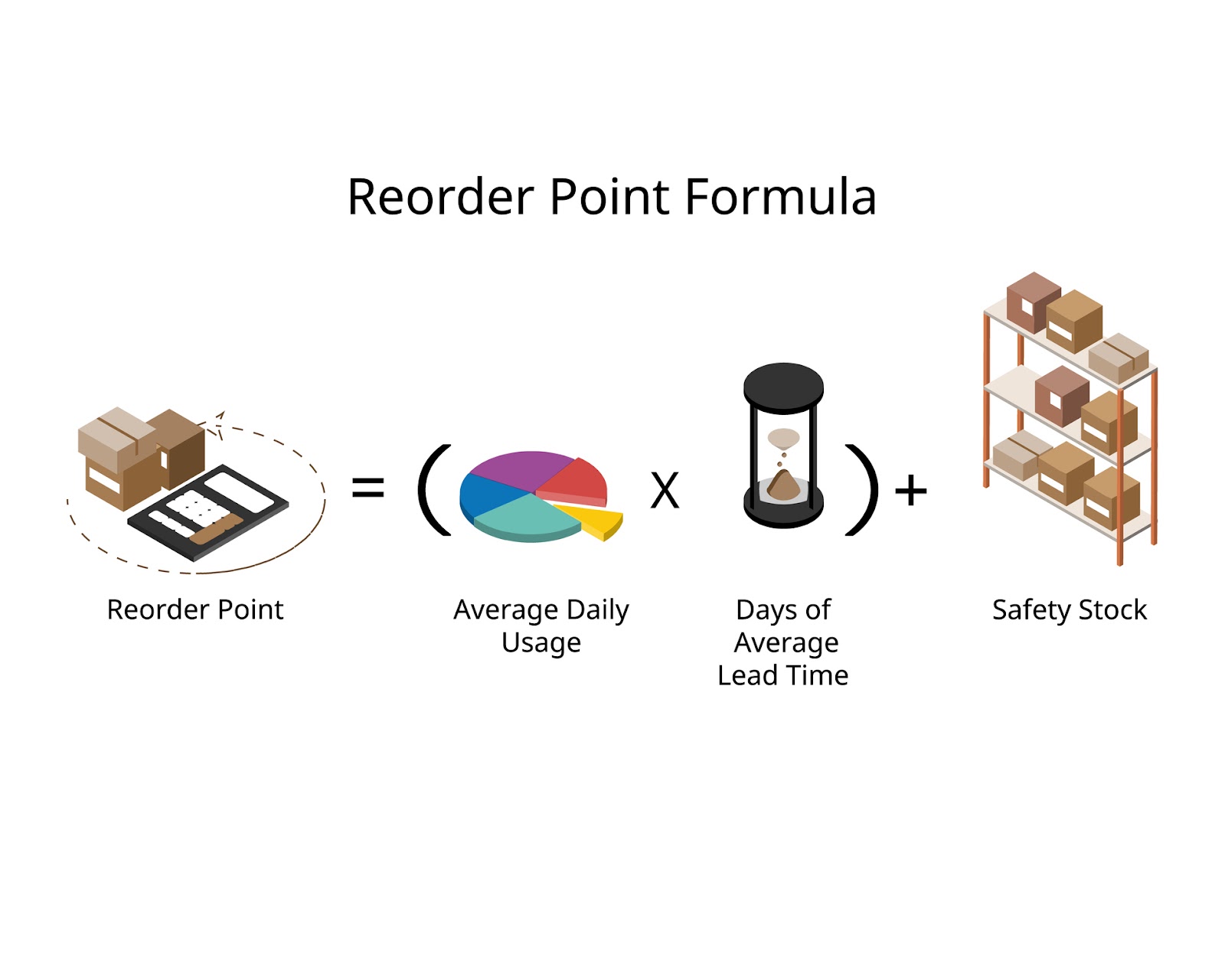
The reorder level formula is:
Reorder level = Average daily usage × Lead time + Safety stock
This is the foundation of almost every reorder level calculation in inventory management. It tells you the exact point at which you should place a new order so that stock arrives before you run out.
What Is Reorder Level in Inventory Management?
Reorder level is the point at which you need to place a new purchase order. Once your available stock drops to this threshold, it is time to reorder more items.
A well-defined reorder level in inventory management is beneficial for several purposes. It prevents stockouts, limits last-minute shipping costs, and keeps cash flow under control. As for the latter, calculating the reorder level formula helps avoid unnecessary overstocking and tying up cash.
Why Reorder Level Matters More Than Most Teams Think
Demand spikes aren’t the main cause of inventory problems. As a matter of fact, organisations and stakeholders are fond of increased demand.
The problem arises when reordering happens too late or when lead times aren’t properly estimated.
This is where the reorder level brings peace of mind. When demand, supply, and timing meet at a single decision point, both business owners and customers are satisfied.
In that light, an accurate reorder level calculation allows you to:
- Avoid stockouts without building excess inventory
- Plan purchasing decisions with greater confidence
- Protect revenue when suppliers run late
- Improve inventory turnover
- Reduce cash tied up in slow-moving stock
Reorder level in inventory management is even more important for domestic and international businesses that sell items across multiple channels. Lead times are rarely consistent for them, so short delays can quickly result in reduced sales.
How to Calculate Reorder Level Step by Step
As highlighted above, you need three inputs for a reorder point you can actually trust: average daily usage, lead time, and safety stock. The steps below show exactly how to calculate the reorder level using the standard reorder level formula.
Step 1: Calculate Average Daily Usage
Average daily usage is the number of items you sell or consume each day. It is a core input in any reorder level calculation, so make sure it’s accurate data.
Formula
Average daily usage = Total units sold ÷ Number of days
Example
900 units sold over 30 days:
Average daily usage = 900 ÷ 30 = 30 units per day
Include as recent and relevant data as possible. For fast-selling products and seasonal items, use updated sales intel, rather than long-term historical data.
Step 2: Determine Supplier Lead Time
Lead time is the interval the manufacturer and/or supplier needs for the ordered items to be ready for sale. This information will determine when you need to order the new items.
When calculating lead time, include all relevant stages:
- Supplier processing time
- Manufacturing time
- Shipping and customs delays
- Warehouse receiving and put-away time
Example
Let’s say that the period between the moment you place the order and the time you receive the ordered items is 12 days.
It means that the lead time is 12 days.
But if the provider or manufacturer doesn’t always deliver the ordered goods as specified, calculate an average from recent orders. Adapt your reorder level to ensure a safety cushion in case any delays happen along the way; which takes us to the third step.
Step 3: Calculate Safety Stock
The cushion mentioned above is called the safety stock. It’s your protection from sudden demand spikes or supply postponements. Making sure you don’t run out of stock is crucial if you want to retain the brand reputation you’ve built. That’s why safety stock is a vital element in inventory reorder.
A simple and commonly used minimum reorder level formula for safety stock is:
Safety stock = (Maximum daily usage − Average daily usage) × Maximum lead time
This approach works well for most small to mid-sized inventories. Businesses managing large or complex product ranges may use service-level or statistical safety stock models for greater precision.
Example
Average daily usage = 30 units
Maximum daily usage = 40 units
Maximum lead time = 14 days
Safety stock = (40 − 30) × 14 = 140 units
Once safety stock is set, it becomes the final piece needed to complete your reorder level calculation.
Step 4: Apply the Reorder Level Formula
Now bring all the numbers together using the standard reorder level formula:
Reorder level = (Average daily usage × Lead time) + Safety stock
Example
Average daily usage = 30 units
Lead time = 12 days
Safety stock = 140 units
Reorder level = (30 × 12) + 140 = 500 units
The breakdown: place a new purchase order as soon as your available inventory reaches 500 units.
The new stock will arrive on time, the sales will continue without interruption, and the reorder level in inventory management will remain healthy.
Reorder Level vs. Reorder Point vs. Safety Stock
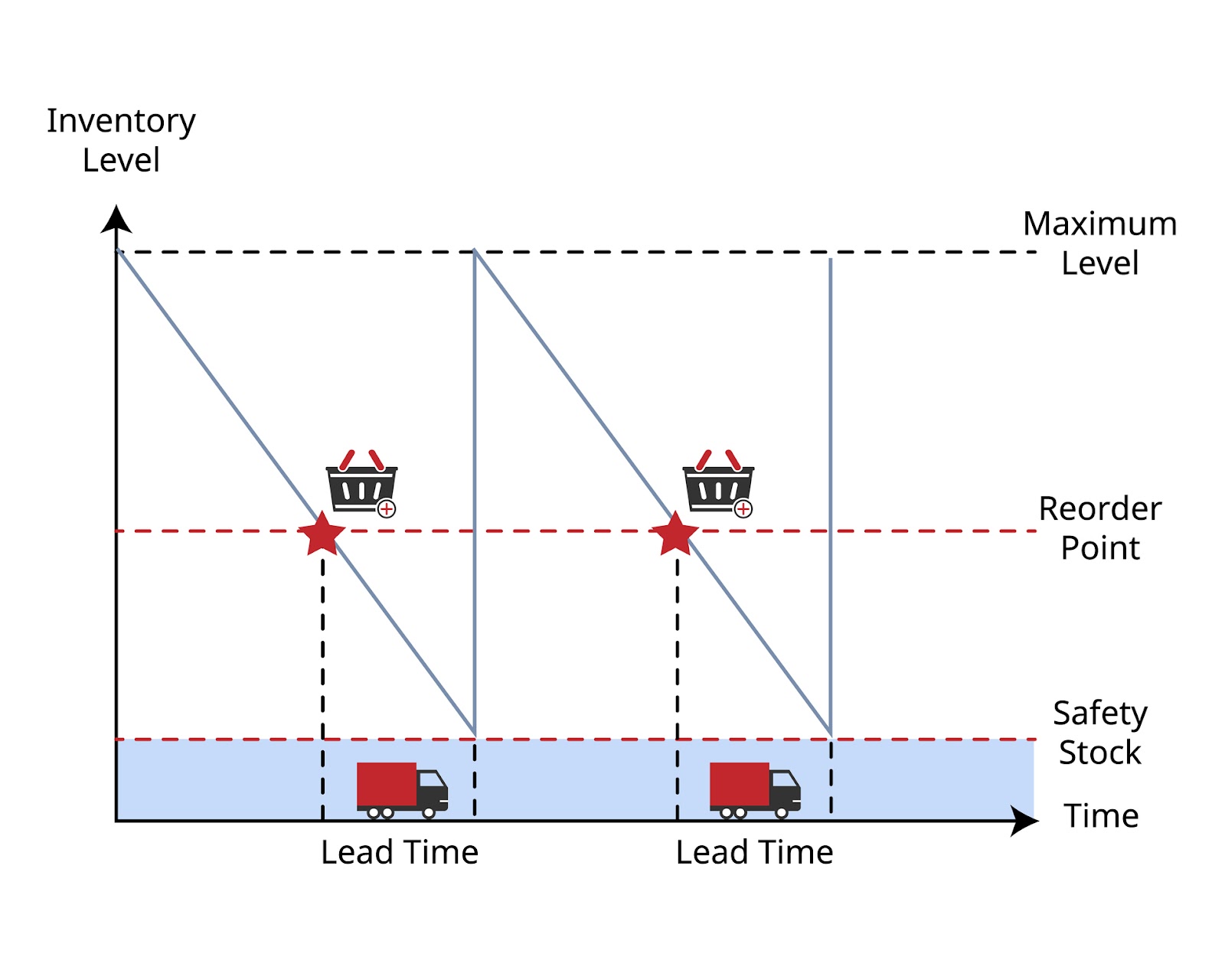
These terms are often used interchangeably, but they play different roles in inventory management. There’s another term worth remembering in the context of reorder level: Economic Order Quantity. EOQ determines how much to reorder. It focuses on cost optimisation by balancing ordering costs and holding costs.
In short, the reorder level (aka reorder point) answers when to reorder, while the EOQ answers how much. Used together, they create a balanced and predictable approach to inventory planning.
How to Calculate Reorder Level in Excel
You can calculate the reorder level in Excel quickly, even for large product lists.
Example setup
- A2: Average daily usage
- B2: Lead time (days)
- C2: Safety stock
Formula:
= (A2 * B2) + C2
This formula gives you the reorder level of inventory for a single product.
For multiple SKUs, apply the same formula across rows. Adding conditional formatting to highlight items that are close to their reorder level makes it easier to spot products that need attention before stock runs low.
Reorder Level for Different Business Types
There is no single reorder level that works for every business. The right approach depends on how you sell, how fast products move, and how predictable your suppliers are. Below, we look at how reorder level in inventory management changes across different business models and operating environments.
E-commerce and Multichannel Sellers
For e-commerce and multichannel businesses, reorder level planning is more complex because demand does not come from a single source. Merchants need to take these variables into account when planning their orders.
Also, platform-specific behaviour should always be considered. Marketplaces, paid campaigns, promotions, and algorithm changes can all trigger short-term demand spikes. Your average daily usage should reflect combined sales across channels, not isolated store data.
Fulfilment structure also plays a major role. If you sell internationally or store inventory in multiple warehouses, lead times can vary significantly.
Automation helps reduce risk. Reorder alerts tied to real-time stock levels allow you to react before inventory reaches critical thresholds. This is especially important when managing hundreds or thousands of SKUs across multiple sales channels.
Retail and Small Businesses
For small businesses, balance in reorder levels is crucial. Enough stock prevents lost sales, while too much stock ties up cash. A conservative safety buffer, reflecting actual risk rather than formulas for large operations, often proves more practical.
Distinguishing fast‑moving from slow‑moving products is also a practical method here: best‑sellers benefit from tighter calculations, while slower items go with lower reorder points and longer review cycles.
Monthly reviews allow adjustments for shifting demand, supplier reliability, and seasonal influences
Seasonal Products
Seasonal inventory demands flexible reorder levels because annual averages rarely match real buying behaviour. Static calculations often cause costly overstock after peak periods or shortages during high demand.
Adjust daily usage by season, rely on pre‑peak sales data, and recalculate before busy periods to account for longer lead times and supplier competition.
Common Reorder Level Mistakes to Avoid
Most stockouts happen because the inputs are outdated or unrealistic. A solid reorder level calculation only works if the numbers behind it reflect what is happening right now.
Here are the most common mistakes to watch for:
- Outdated sales data
If your average daily usage is based on an old period, your reorder level won’t respond to real demand. The result: unexpected stockouts. - Ignoring lead time variability
Lead time is rarely fixed. If you only plan for “best-case” delivery times, one delay can wipe out your inventory during the wait. The result: unexpected stockouts. - Zero safety stock
Sudden sales spikes, supplier issues, or warehouse receiving delays can empty your inventory. Zero safety stock means no protection when something shifts. The result: unexpected stockouts, once again. - Applying one reorder level to all products
Fast movers, slow movers, and seasonal items behave differently. They demand a different approach to the reorder level. The result: excess stock in some areas and shortages in others. - Not updating reorder levels as demand changes
Promotions, channel growth, new markets, and seasonality all change usage rates. If your reorder level does not change with them, it becomes pointless.
It’s smart to review reorder levels on a schedule and recheck key inputs whenever sales patterns or supplier performance change.
Can Reorder Level Be Automated?
Sure thing.
Modern inventory systems automate reorder level calculation by analysing sales velocity, stock movement, and supplier performance.
Unlike static spreadsheets, they update thresholds in near real time as conditions change. Live data from sales channels, warehouses, and suppliers ensures that as usage rises or lead times shift, reorder levels adjust automatically. This is especially useful for businesses managing many SKUs or selling across multiple platforms.
Advanced tools extend beyond basic alerts. They track historical lead time variability, adjust safety stock dynamically, and flag items likely to stock out before the next delivery. For multi‑warehouse operations, automation calculates different reorder levels per location, reflecting regional demand and fulfilment routes.
Consistency is another advantage. Manual processes often fail during busy periods or rapid growth. Automated systems reduce errors, align purchasing with demand, and free teams to focus on planning and optimisation.
How Reorder Level Fits Into a Smarter Fulfilment Strategy
Well-executed reorder level is at the centre of how well your fulfilment operation performs and how predictable your customer experience becomes.
A well-set reorder level in inventory management directly influences:
- Delivery speed, by ensuring stock is available where orders are fulfilled
- Customer satisfaction, by reducing backorders and missed delivery promises
- Cash flow, by preventing excess inventory from tying up capital
- Warehouse use, by keeping stock levels aligned with actual demand.
When reorder levels are paired with reliable lead times and a distributed fulfilment setup, inventory stops being reactive. Instead of rushing emergency orders or overstocking “just in case,” businesses can plan replenishment with confidence.
Struggling with overstock or stockouts? See how optimised fulfilment networks keep reorder levels balanced automatically.
Conclusion
Reorder level marks the point where stock refill should begin, so stock doesn’t run out during the supplier lead time. The calculation itself is simple, but its reliability depends on how well sales data reflects reality, how lead times are understood, and how safety buffers are set.
With regular reorder levels, inventory becomes far easier to manage. The risk of stockouts drops, cash flow feels steadier, and growth is significantly lower. With the right inputs and consistent attention, reorder level turns into a dependable anchor for scaling with confidence.
Foire aux questions
What is the minimum reorder level formula?
The minimum reorder level formula usually excludes safety stock:
Average daily usage × Lead time
This approach is riskier and not recommended for products with volatile demand or inconsistent supplier performance.
Is reorder level the same as reorder point?
Yes. Reorder level and reorder point are commonly used interchangeably in inventory management and refer to the same trigger point for reordering stock.
How often should reorder levels be updated?
Fast-moving items should be reviewed weekly or monthly.
Slow-moving products can be reviewed quarterly.
Seasonal items should be recalculated before each selling season.
What KPIs support reorder level optimisation?
Key metrics include inventory turnover, stockout rate, days inventory outstanding, and lead time variability. Together, these KPIs help validate and refine reorder level calculation.
Can small businesses use reorder levels effectively?
Yes, they can. Even simple spreadsheets and basic formulas can significantly improve purchasing decisions when applied consistently and reviewed on a regular schedule.

Freddy Bruce

As a part of the Bezos.ai team, I help e-commerce brands strengthen their fulfilment operations across the UK, Germany, the Netherlands and the US. I work with merchants that want to simplify logistics, reduce costs and expand into new markets. I’m also building my own e-commerce brand, which gives me practical insight into the challenges founders face. In my writing, I share fulfilment strategies, growth lessons and real-world advice drawn from both sides of the industry.


